

If your organization connected an AI tool to Microsoft 365, Google Workspace, or another cloud platform in the past year, there is a reasonable chance you granted it more access than the task required.
That is not necessarily a failure in judgment. In many cases, broad access is the only option a connector offers. The tool works immediately once you approve the connection, and few teams stop to examine what that approval actually permits.
But “it works” and “it is appropriately scoped” are two different questions. Much of today’s AI tooling makes it easy to answer the first one. It does not always make the second one easy.
For organizations managing sensitive client, patient, financial, legal, operational, or donor information, that distinction matters.
Why AI Tools Often Receive Too Much Access
Modern cloud platforms were not originally designed with fine-grained AI access in mind. When you connect an AI assistant to email, file storage, or collaboration tools, the permission may not be limited to one folder or one workflow.
Instead, the connector may request access to everything the connecting user can access, including:
- Email and mailbox folders
- Calendars
- Files and shared drives
- SharePoint sites
- Teams conversations
- Other connected cloud resources
The tool may not be acting maliciously. The problem is that the platform may offer a broad permission as the simplest available path.
This creates an implicit trade: convenience now in exchange for a standing credential that can reach far more of the organization than the task requires.
Most of the time, nothing goes wrong. The connection remains in the background, and the organization continues operating as usual. However, “nothing has gone wrong yet” is not an access-control strategy. It is an assumption about how a credential will behave if it is misused, compromised, or connected to an unexpected workflow.
That is why secure AI solutions require more than evaluating whether a tool is useful. You also need to understand what the tool can reach, what it can change, and how long that access remains active.

Least Privilege Applies To AI, Too
Least privilege means giving a user, application, or system only the access required to perform its intended function, and no more.
For a human employee, that might mean access to a department’s shared folder but not the entire company file system. For an AI assistant, the same principle applies. The assistant should have access to the specific data source, action, or workflow it needs.
Least privilege is especially important in secure AI automation because AI tools can process information quickly and interact with systems at a scale that a person may not. A broad permission can therefore create a broad exposure, even when the original task appears small.
A practical least-privilege review asks:
- What specific task does the AI tool perform?
- What data does that task actually require?
- What actions must the tool take?
- What access is being granted by default?
- Can the same result be achieved with a narrower design?
The answers should be specific. “Work with our files” is not a sufficiently defined purpose. “Read completed meeting notes from one designated location and place them in one project folder” is much easier to evaluate and secure.
This approach is central to Microsoft 365 security, particularly when workflows involve SharePoint, OneDrive, Teams, Exchange Online, or other connected services.
A Concrete Example: Narrowing A Meeting-Notes Workflow
We recently worked through this problem for a client automating a meeting-notes workflow.
The AI assistant needed to perform one task: take a completed note and place it in the appropriate project folder.
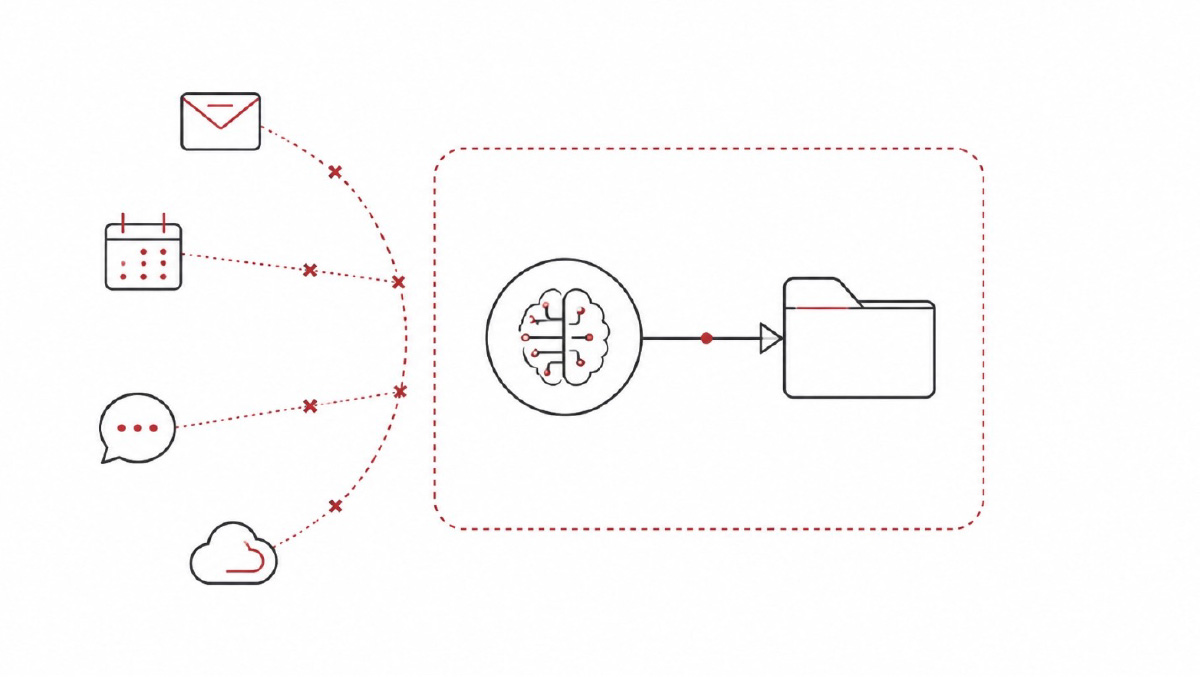
The fastest way to build the workflow gave the AI tool standing access to the client’s entire Microsoft 365 environment. That included every file, mailbox folder, calendar entry, and Teams conversation available through the connection, whether or not the assistant needed any of them.
The issue was not that the automation lacked value. The issue was that the access model was much broader than the job.
The more useful question became:
What is the smallest possible thing this tool needs to touch?
In this case, the answer was one folder, and nothing else.
The workflow was rebuilt around that requirement rather than around the connector’s default permission scope. The AI tool no longer has cloud credentials. It writes to a single local folder, and separate, already-trusted automation handles the remaining steps.
The end-user experience remains the same. The automation still accomplishes its intended purpose. The difference is that the AI component has a much smaller exposure.
That is the value of secure AI automation: you do not necessarily need to abandon a useful workflow to improve its security. You may need to redesign how the workflow is connected.
Separation Of Duties Reduces Exposure
Least privilege limits what a component can access. Separation of duties limits what any one component can do from beginning to end.
These principles work well together.
In the meeting-notes example, the AI tool handles the content-related step, while a separate trusted automation handles the cloud process. Neither component needs to control the entire workflow independently.
This can reduce risk in several ways:
- The AI tool does not need direct access to the broader cloud environment.
- The automation does not need to perform the AI processing itself.
- A single credential is not responsible for every step.
- Each part of the workflow has a defined purpose.
- Access can be reviewed according to the function it supports.
Separation of duties is not limited to large enterprises. It can be useful for professional services firms, nonprofits, associations, healthcare practices, legal and accounting firms, construction and engineering companies, and other organizations where a small workflow may involve highly sensitive information.
It also supports better AI governance. When a workflow has clear boundaries, it becomes easier to assign ownership, document its purpose, review permissions, and change or disable one component without disrupting everything else.
 Questions To Ask Before Connecting An AI Tool
Before granting an AI tool access to a business system, ask the following questions.
What Does The Tool Actually Need To Do?
Define the task in operational terms. Avoid broad descriptions such as “help with documents” or “work with our Microsoft 365 data.”
Identify the one or two concrete actions the tool performs. Does it summarize a document, classify an intake form, draft a response, move a file, or trigger a workflow?
Is The Permission Scoped To That Task?
Determine whether the permission matches the task or simply reflects the broadest option the connector provides.
A tool that needs one SharePoint folder should not automatically receive access to every site. A process handling a shared mailbox should not automatically reach every mailbox.
What Is The Potential Blast Radius?
If the credential were compromised or misused, what could it reach?
Would the impact be limited to one folder, one mailbox, or one workflow? Or could the connection expose the organization’s wider email, files, calendars, and conversations?
This question is not intended to create fear. It is intended to make the access decision concrete.
Can You Use A Narrower Architecture?
Consider whether a dedicated restricted account, local-only integration, intermediate folder, or purpose-built automation can deliver the same business outcome.
The most secure design is not always the fastest design to deploy. However, a slightly more deliberate build may substantially reduce unnecessary access.
Who Owns The Connection?
Every AI workflow should have a clear business purpose and a responsible owner. Someone should know why the connection exists, what it can access, and when it should be reviewed or removed.
This is an important part of an AI strategy. Adoption without ownership creates uncertainty. Governance without practical workflows creates friction. The goal is to establish useful boundaries that support responsible adoption.

Secure AI Adoption Is A Design Decision
AI tools are genuinely useful. They can improve productivity, support knowledge work, and automate repetitive processes across organizations of many sizes.
The mistake is not adopting AI. The mistake is accepting the default permission scope without asking whether a narrower one would accomplish the same job.
For organizations using Microsoft 365, secure adoption should include a review of connected applications, SharePoint and OneDrive permissions, mailbox access, workflow triggers, and the accounts or credentials supporting each integration. It should also include a practical plan for monitoring and revisiting those connections as workflows change.
Elite IT helps organizations evaluate technology as part of a broader business and security strategy. Our Microsoft 365 services support secure deployment, identity and access controls, SharePoint and OneDrive governance, Teams management, and ongoing platform administration. Our cybersecurity solutions help organizations strengthen protections around users, devices, systems, and sensitive information.
If your team has connected AI tools to business systems and no one has specifically reviewed what those connections can reach, it is worth starting that conversation now.
Schedule a consultation with Elite IT to evaluate your AI workflows, access model, and next steps for secure AI adoption.